![Text Logo White.svg]](https://support.apprentiscope.com/hubfs/Company%20Logos/Text%20Logo%20White.svg)
User Types: Regulators, Sponsors, Employer Administrators, Supervisors, Mentors, Providers, Apprentices & Applicants
Step 1: Open Google Chrome on your Android device
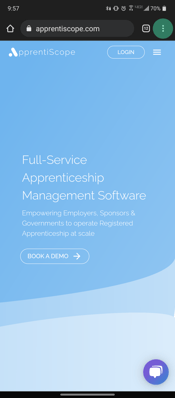
Step 2: Navigate to https://www.apprentiscope.com
Step 3: Tap the three dots icon in the top right corner as shown below
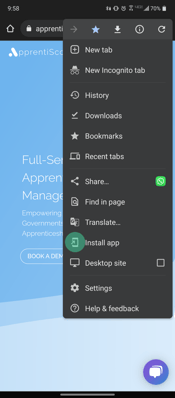
Step 4: Tap the Install App button
Step 5: Tap the Install button
-png.png?width=175&name=Group%204%20(2)-png.png)
Step 6: Now, the ApprentiScope app will be installed on your home screen. That's it!
.png?width=175&name=image%204%20(1).png)
If you have questions or need help, please submit a Support Ticket here.