![Text Logo White.svg]](https://support.apprentiscope.com/hubfs/Company%20Logos/Text%20Logo%20White.svg)
User Types: Regulators, Sponsors & Employer Administrators
Using a Webhook in ApprentiScope
Webhooks let ApprentiScope send real-time data to your other systems when specific events occur—enabling integrations with CRMs, enrollment systems, and other automation tools.
How Webhooks Work
- When a specific event happens in ApprentiScope, a webhook can automatically send data to a URL you specify. The receiving system can then use that data to trigger actions, update records, or log events.
Our Current Webhook Trigger
-
User Status Updates – Sends data when a user’s status changes - account status, program status, and/or applicant status.
For each event, the webhook sends both the old user data and the new user data to the specified URL.
Setting Up a Webhook
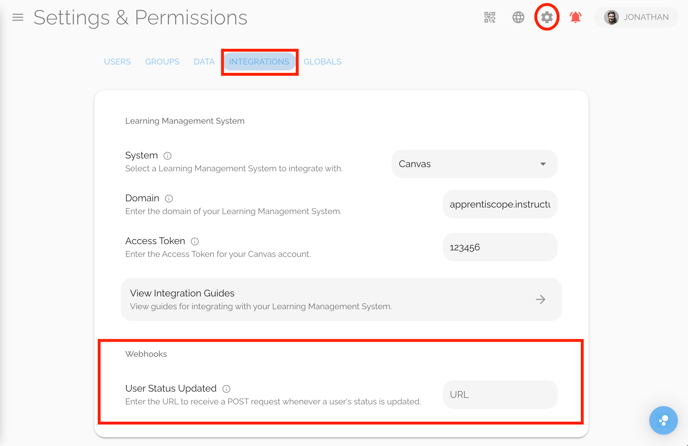
- Navigate to Settings → Integrations → Webhooks
- Find the event trigger you want to use (only User Status currently but more to come soon).
- Paste your destination URL (this is where ApprentiScope will send the webhook data).